


Hairstyle Video Tutorials
3.338.00 Reviews
App Specs
- Version
- 3.0.550
- Updated On
- License
- Free
- Downloads
- 100,000+
- Developer
- Rstream Labs
- Categories
- Beauty
- Platform
- Android
Screenshots
 Analysis by AppCompare
I find hairstyle tutorials most useful when they help me make a realistic decision before I start: whether I have the time, tools, and patience for the look, and whether the instructions seem manageable in my own mirror. Hairstyles Tutorial Guide is aimed at that practical moment, offering a place to explore different looks and work through guidance at home. It is a beauty app from Rstream Labs, and its appeal is straightforward: try learning a style yourself instead of relying on a salon appointment for every change.
What to expect when you open it
The app is free to download, though it offers in-app purchases, so I would treat it as a way to explore first rather than assume every option is included at no cost. Its average rating is 3.3 from around 835 ratings, which suggests a mixed reception rather than a universally smooth experience. That is useful context: it may suit someone who wants hairstyle ideas and basic guidance, but I would keep expectations measured and judge it by whether the available instructions match the way I like to learn.
For speed, the main benefit is having hairstyle guidance gathered in one app instead of searching through separate pages or clips. A quick search can be handy when I already have a look in mind, while browsing makes more sense when I am undecided. The practical time saving depends on finding a tutorial that fits my hair, tools, and skill level. An idea may be quick to locate but still take practice to recreate, so I would not confuse fast browsing with an instant salon finish.
Using the tutorials in real life
I use this section to think through the moment when a tutorial leaves the screen and becomes a real styling attempt: what to prepare, how to make the instructions easier to follow, and when to change course rather than force a look. A small setup habit can save time and frustration, especially when I am learning a technique for the first time.
Explore the variety
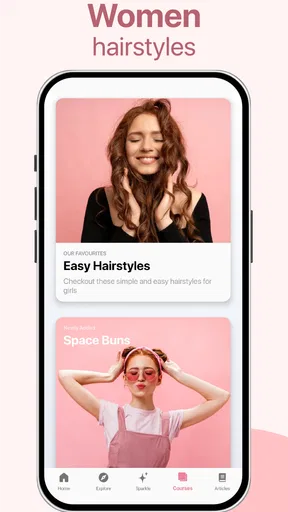
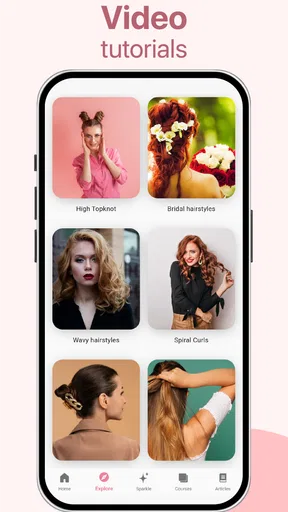
One of the standout features of this app is the sheer variety of styles available. Seriously, it's like a treasure trove for hair enthusiasts. From elegant updos for formal events to casual waves for a day out, the app has it all. Each tutorial is accompanied by detailed, step-by-step instructions and high-quality images or videos, ensuring you can follow along with ease.
That mix of styles is most useful when I have a particular occasion in mind but have not settled on a look. For example, before a family gathering, I might browse for an updo, then narrow the choice to one I can attempt with the clips and brush I already own. I would check the steps before washing or styling my hair, rather than discovering halfway through that the look depends on a technique I have never tried. A tutorial can inspire the choice, but a little preparation is what makes trying it less stressful.
And let's not forget about the search function. It's super handy for those moments when you're in a rush and need to find a specific style pronto. Just type in what you're looking for, and boom, you're there.
Worth Reading Before You Choose

EA SPORTS FC Mobile 26 Is a Bigger Football Game, but It Takes Time

Flipboard Shows What News Apps Must Do Beyond the Feed

Switching to Android Auto Means Rethinking Your Driving Routine

Google Calendar Makes a Crowded Week Easier to Manage

Ludo King Makes the Most of the Minutes Between Plans

Baby Panda World Brings Quick Play to Modern Phones, but Its Game Library Feels Busy
Finding a look that suits your time and skill
Search works best when I use it to narrow the goal, not when I expect it to choose for me. Searching for a braid, for instance, can point me toward the broad style I want, but I still need to decide whether I can manage the hand movements and finish with the time available. If I am new to styling, I would start with a simpler version and save intricate looks for a day when I can pause, rewind, or retry without watching the clock.
A useful trade-off is that a broad collection gives me more inspiration but also more choices to sort through. When I am getting ready for work, I would search for one practical idea rather than browse endlessly. For a weekend experiment, browsing is part of the fun. I would also take a moment to compare the tutorial’s finished look with my own hair length and texture; a technique can still be worth learning even if the exact result will differ.
Personalized recommendations
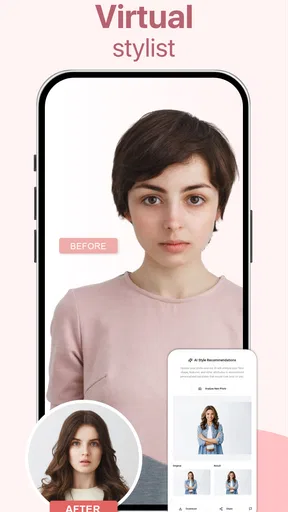
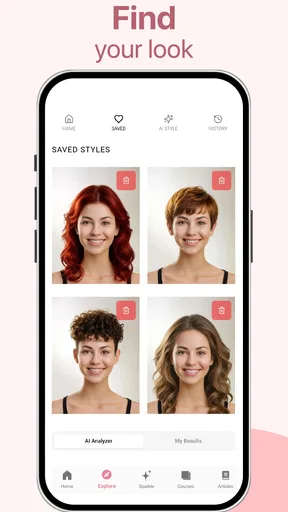
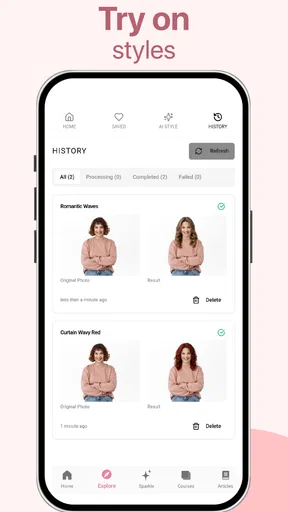
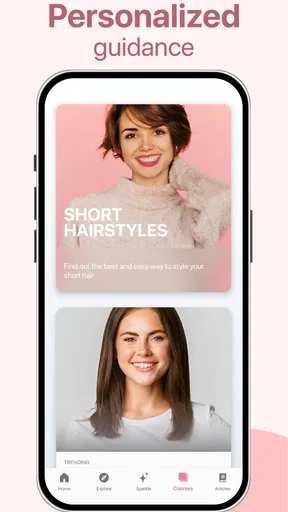
Another nifty feature is the personalized recommendations. The app learns from your preferences and suggests styles you might like to try. It’s like having a hair guru who knows exactly what suits you. Plus, the app keeps you updated with the latest trends, so you’re always in the loop with what's hot in the world of hair fashion.
Recommendations can be a convenient starting point when I do not know what to try next, but I would treat them as prompts rather than expert advice about what will suit me. A suggested look still has to fit my routine, comfort, and ability to style it. If the recommendations keep pointing me toward styles that do not work for my needs, a direct search is the more efficient route. I also would not assume that a trend is automatically a good everyday choice; ease of upkeep matters just as much as the look in a tutorial.
Community and inspiration
What makes this app truly special is its community aspect. You can connect with other users, share your creations, and even get feedback. It's a fantastic way to draw inspiration from fellow hair enthusiasts and share your own styling journey. And if you ever feel stuck, there's always someone ready to lend a helping hand or offer a tip.
For me, community features are most valuable as a source of ideas and encouragement, not as a substitute for professional advice. Seeing how another person approaches a style can suggest a small adjustment I might try, but results vary with hair and technique. Anyone who prefers to keep their styling practice private can focus on the tutorials instead; social participation is not the reason I would choose a hairstyle guide in the first place.
Tools, preparation, and sensible limits
Let’s talk about the tools section. Not only does the app guide you on hairstyles, but it also offers advice on the best tools for each look. Whether you need the right straightener or the perfect set of curlers, the app has got you covered. Plus, there are handy tips on hair care, ensuring your locks stay healthy and vibrant.
I would use tool advice as a planning checklist, not as a reason to buy something before I know I need it. Before starting, lay out what you already have and see whether the technique can be adapted; if a tutorial depends on equipment I do not own, that may be a good reason to choose another style. This is a practical way to keep a free app from turning into an unnecessary shopping list, especially when I am only experimenting.
There is also a difference between learning a styling method and knowing what is safe for every head of hair. I would be cautious with heat, avoid rushing through unfamiliar steps, and stop if a technique causes discomfort. The app’s care tips may help with general preparation, but a tutorial cannot take the place of individual advice when someone has a specific scalp or hair concern. That limit is worth remembering when moving from inspiration to hands-on styling.
How it fits alongside other ways to learn
Compared with searching the web for scattered ideas, a dedicated hairstyle guide can make browsing feel more focused: I can look for a style and follow an organized set of instructions rather than jumping among unrelated results. Compared with a video platform, though, a tutorial app may not offer the same breadth of creator perspectives or the chance to see every hand movement from multiple angles. Which is better depends on how I learn. If I need to watch a technique closely, a video may be easier; if I want a compact place to browse options and get started, this app is a sensible first stop.
It is also different from booking a stylist. A home tutorial is useful for practicing and trying everyday looks, but it cannot reproduce a professional consultation or guarantee a polished result for an important event. For a wedding or another occasion where the finish matters a great deal, I would practice the chosen style beforehand or consider a salon. The app makes experimentation more accessible; it does not make every intricate look effortless.
Reliability during a styling session
When I use a guide while working with both hands, reliability means being able to return to the instructions without losing track of the step I am on. I would set up the phone somewhere easy to see and gather the tools first, which reduces interruptions whether I am following text, images, or video. If the app feels slow or a page does not behave as expected, restarting a tutorial or switching to a simpler style is less frustrating than trying to push through while my hair is half-finished.
I would not plan a time-sensitive look around any app without leaving a buffer. Styling involves trial and error, and the phone is only one part of the process. The most dependable approach is to choose a familiar or manageable tutorial for an event day, then save ambitious experiments for when a delay will not matter. That advice applies especially to a first attempt, when the steps may take longer than they appear.
Device fit and everyday use
The current version is 3.0.550, and the minimum operating-system requirement is Android 7.0. That makes the compatibility question simple for Android users: check the device’s system version before installing. The app is rated for teens, so it is not presented as an adults-only beauty tool. Its price is free, with optional in-app purchases listed from $0.49 to $59.99 per item; I would check purchase details in the app before paying for anything.
Because hairstyle guidance can involve looking back and forth between a screen and a mirror, a phone that is easy to position is more useful than a large collection of extras. I would place it on a stable surface at a comfortable viewing angle and keep it away from water and styling products. If the screen is hard to see from the mirror, pausing to check each step is a reasonable workaround. That small setup choice can make a tutorial easier to follow without requiring additional equipment.
Hairstyles Tutorial Guide was released on February 15, 2019, and has over 100,000 installs. Those figures show that it has found an audience, but they do not guarantee that every feature or tutorial will suit every user. I would approach it as an accessible source of ideas, then decide whether its organization and guidance work for me in practice. Its moderate average rating is another reason to keep expectations realistic rather than assume it will replace every other way of learning hair.
Who is likely to enjoy it
The app is a good fit for someone who wants to try new looks at home, enjoys browsing hairstyle ideas, or needs a starting point before practicing for an event. It is especially useful for a curious beginner who can accept that the first attempt may be imperfect. Someone who already knows exactly what they want may appreciate search more than browsing, while someone who likes discovering styles can spend more time exploring the variety.
I would skip it if I needed guaranteed professional results, highly tailored advice, or a tutorial that precisely matches a particular hair type and situation. It may also be a poor fit for a person who wants to learn only by watching detailed demonstrations and finds written or image-based guidance difficult to follow. In those cases, a stylist, a focused video lesson, or hands-on help from someone experienced may be a better choice.
Why you’ll love it
The main reason I fell in love with Hairstyles Tutorial Guide is its accessibility. It's perfect for those who might not have time to visit a salon regularly or those looking to experiment with their look from the comfort of home. The satisfaction of mastering a new style on your own is incredibly rewarding.
Moreover, the app is regularly updated with fresh content, so there’s always something new to try. Whether you’re preparing for a big event or just looking to switch things up, this app has something for everyone.
So, if you’ve ever wanted to transform your hair game, give Hairstyles Tutorial Guide a try. It's like having a personal hairstylist at your fingertips, ready to help you create your next masterpiece. Ready to make every day a good hair day? Download the app and start your hair adventure today!
My verdict on the experience
I see this as a low-pressure way to explore hairstyles, not a shortcut to mastering every technique. Its best use is pairing a clear idea with a realistic plan: choose a style, check the steps, gather what you already own, and leave time for practice. The main trade-off is that a broad guide can inspire experimentation without offering the personal attention of a salon or the depth of every specialist video lesson.
Overall, I would recommend it to a friend who enjoys trying looks at home and is comfortable learning by following app guidance. I would suggest keeping purchases optional, starting with a manageable style, and using another resource when a technique needs close visual instruction. For that kind of user, it offers a convenient place to begin; for someone who needs certainty or individualized results, a different route will be more dependable.
Pros
- User-friendly interface and easy navigation.
- Wide range of hairstyle categories.
- Step-by-step video tutorials available.
- Offline access to saved tutorials.
- Regular updates with new styles.
Cons
- Requires in-app purchases for premium content.
- Contains ads that may interrupt usage.
- Limited stylistic options for short hair.
- Some tutorials lack detailed instructions.
- No community interaction or feedback features.
FAQs for Hairstyle Video Tutorials
What is the Hairstyles Tutorial Guide app?
The Hairstyles Tutorial Guide app is a comprehensive tool designed to help users learn and master various hair styling techniques. It offers step-by-step video tutorials, detailed instructions, and tips for creating both classic and trendy hairstyles. Ideal for beginners and professionals alike, this app serves as a personal hair-styling tutor.
Is the Hairstyles Tutorial Guide app free to use?
The app offers a free version with access to a limited selection of tutorials and features. However, to unlock the full range of tutorials, advanced tips, and additional functionalities, users can opt for a premium subscription. Pricing details and subscription options are available within the app.
What types of hairstyles are covered in the app?
The Hairstyles Tutorial Guide app covers a wide variety of hairstyles, including everyday looks, formal updos, braids, curls, and more. Each category provides tutorials suitable for different hair lengths and types, ensuring that users can find styles that match their personal preferences and needs.
Can I use the app offline?
Yes, the Hairstyles Tutorial Guide app allows users to download tutorials for offline viewing. This feature is particularly useful for those who want to practice styling without internet access. Simply download your favorite tutorials in advance and access them anytime, anywhere.
Is the app suitable for all hair types?
The app is designed to cater to a diverse range of hair types, including straight, wavy, curly, and coily textures. Each tutorial provides specific guidance to accommodate different hair characteristics, ensuring that users can effectively replicate styles regardless of their hair type.


